
For: Administrators, programme managers, leadership · 2 minutes read
After you sign in, DEOS opens on Today, the dashboard.
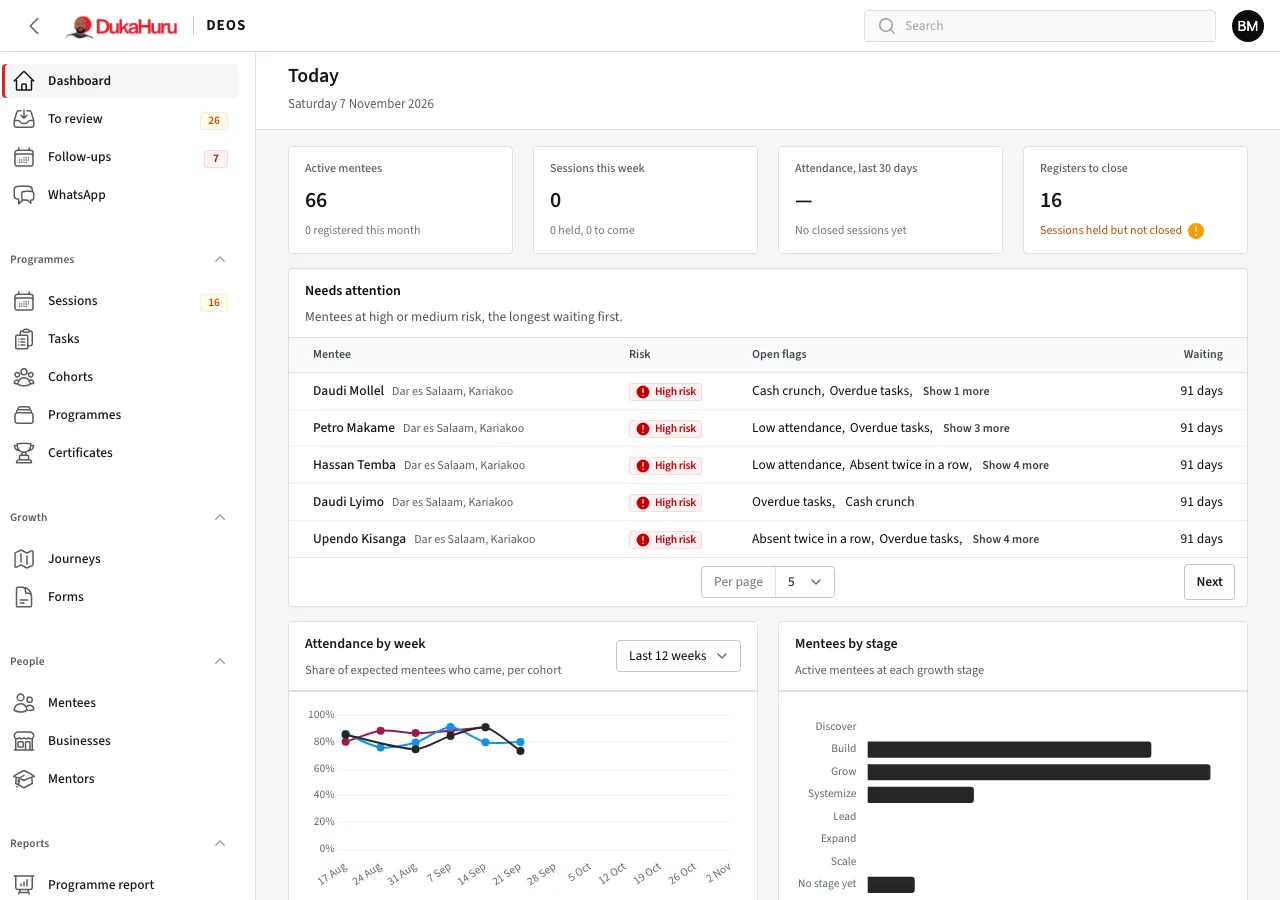
The dashboard
- The figures at the top: active mentees, sessions this week, attendance over the last 30 days, and registers still to close.
- Needs attention: mentees at high or medium risk, the ones waiting longest first. Click a name to open the mentee.
- The charts: attendance by week per cohort, and how many mentees are at each growth stage.
The menu
The menu on the left is grouped:
| Group | What is in it |
|---|---|
| (top) | Dashboard, To review (hand-ins waiting for a decision), Follow-ups, WhatsApp |
| Programmes | Sessions, Tasks, Cohorts, Programmes, Certificates |
| Growth | Journeys, Forms |
| People | Mentees, Businesses, Mentors |
| Reports | Programme report, Mentee report |
| Website | Website content, services and books, bookings, blog, newsletter |
| Setup | Monthly bootcamp, session types, growth stages, formulas and more |
| Administration | Staff, registration and fee, reminders, message log, system health |
A number beside a menu item is work waiting: hand-ins to review, follow-ups overdue, registers to close or WhatsApp messages unread.
You only see what your role allows. A programme manager sees the programmes they manage; leadership can read everything but change nothing.
Search
The search box at the top finds mentees, businesses and other records by name, number or phone.